Coach Tier
The Coach Tier turns PlanWatts into a team coaching platform. If you're a coach who works with athletes — whether it's a junior cycling club, a triathlon squad, or a running group — this is how you manage them all from one place.
I built this because I kept hearing the same thing from coaches: "I love the AI for creating workouts, but I need to push them to my athletes." So that's exactly what the Coach Tier does. You create plans and workouts using PlanWatts (with all the AI assistance), then deploy them to your team with one click.
How It Works
The flow is simple:
- You get the Coach role — an admin assigns it to your account
- You create a team — give it a name, pick a sport
- You invite athletes — share a code or link, they join for free
- You create plans and workouts — using the same AI Coach and editor you already know
- You deploy to the team — your athletes see the workouts on their calendars
That's it. No separate app, no extra accounts, no billing headaches for athletes.
Coaching is in preview. The Coach role is enabled on request: write to [email protected] or message @planwatts on Telegram and I enable it on your account. It is free while in preview, and your athletes never pay.
AI as Your Force Multiplier
The AI Coach doesn't replace you — it makes you faster. You still decide the training philosophy, the periodization, the race strategy. But instead of spending an hour writing interval sessions by hand, you tell the AI what you need and it drafts the workout in seconds. You review it, tweak it, and deploy it.
Think of it as having a very fast assistant who knows sports science but defers to your judgment.
Zero Friction for Athletes
Your athletes don't need to pay anything. They join your team with a code or link, and your plans show up on their calendar automatically. They see a Coach badge on workouts that came from you, so they always know what's theirs vs. what came from their coach.
Athletes can still use PlanWatts on their own (free tier) — your coaching layer sits on top of whatever they're already doing.
Tip: Athletes who connect Intervals.icu or Strava get even more value — you can see their activity data and the AI can factor in their actual training load when giving advice.
The AI Reads Your Roster
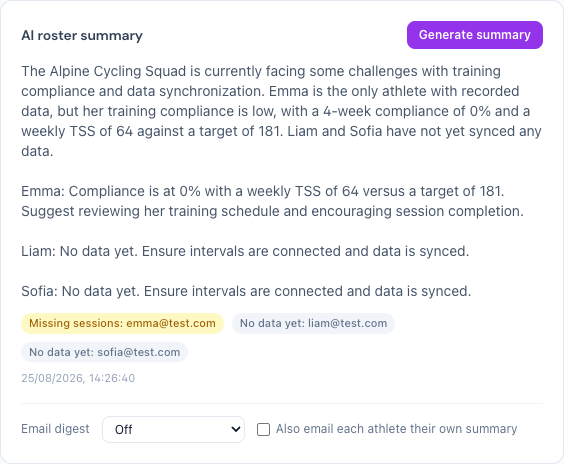
Open the Coach Dashboard and generate a plain-language summary of your team's week with one click. It comes from the same wellness and training-load numbers that already power the dashboard; the AI phrases and prioritizes them, it does not invent physiology.
Each athlete can carry a flag that tells you where to look first:
- Ramping too fast: training load has climbed over the past week while form (TSB) is already low
- Under-recovering: form (TSB) is deeply negative or falling week over week
- Missing sessions: planned workouts are going undone
- No data yet: the athlete hasn't connected Intervals.icu or Strava, so there's nothing to read
Ask the chat about the whole team
The coach chat isn't limited to one athlete at a time. Ask "How was the team's week?" or "Who's not following the plan?" and it answers with the real numbers behind the flags. Ask about one athlete by name and you get the same detail you'd find on their own page.
Nothing reaches a calendar without your approval
Ask the chat to lower an athlete's load, or click Adjust Plan from their page, and the AI drafts a workout instead of pushing it straight out. You review it and approve it, either in the chat or from the dashboard, before it lands on the athlete's calendar. Nothing is scheduled behind your back.
Ask AI and Adjust Plan, from the athlete's page
Open any athlete's page and you'll find Ask AI and Adjust Plan buttons. Both open the chat already focused on that athlete, so you don't have to explain who you mean.
The digest, by email
From your team settings you can turn on a digest: off, weekly, or daily. Turn on the athlete copy and each athlete also gets an email of their own, but only with their own week; the digest never puts one athlete's data in front of another.
Your Athletes' AI Knows Who Their Coach Is
When one of your athletes asks their own AI what to do today, it answers with the session you assigned instead of inventing one. Ask for something easier and it offers a lighter version of your session that keeps it in place; ask for a new plan and it points at yours and offers complementary work only. It reads your shared notes and the team's weekly notes; your private notes never surface there.
See Also
- Team Setup — Step-by-step guide for coaches to create and manage a team
- For Athletes — What the experience looks like from the athlete's side