Open Steps
Sometimes you don't want a fixed duration — you just want to warm up until you feel ready, or cool down at your own pace. Open steps solve this: your device shows the target, but you press the lap button to move to the next step whenever you decide.
1. What Are Open Steps?
An open step is any workout step without a predetermined time limit. Instead of counting down from 5:00, your device waits for you to press the lap button to advance.
This is common for:
- Warmups — ride or run until you feel loose, then start the workout
- Cooldowns — spin easy until your heart rate comes down
- Free ride / free run — no target, no time limit, just move as you feel
- Race-pace efforts — go hard until you decide to stop
Open steps are supported on Garmin, Wahoo, and other devices that support structured workouts via Intervals.icu.
2. Creating Open Steps
In the Editor
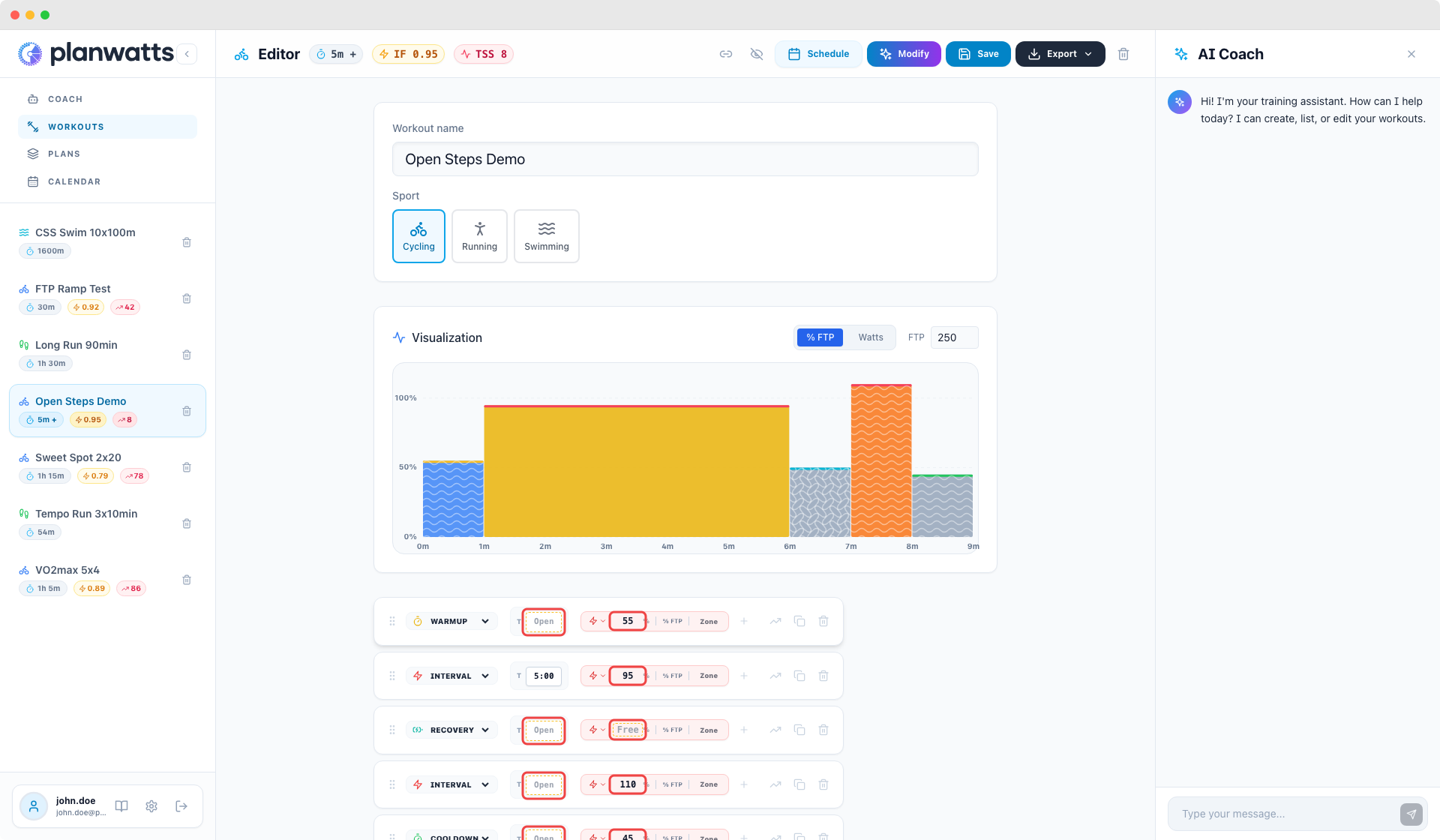
To make any step open, clear the duration field — leave it empty or type 0. The step card shows a dashed amber border and an "Open" label to indicate there's no time limit.
You can also create free ride steps (no power or pace target). Clear the target field and the step becomes fully open: no time limit, no intensity target.
| Duration | Target | Result |
|---|---|---|
| Empty | 75% FTP | Open duration, fixed target — lap to advance |
| 5:00 | Empty | Fixed duration, free ride — no target shown |
| Empty | Empty | Fully open — lap to advance, no target |
With the AI Coach
The Coach only creates open steps, free ride steps, and power range steps when you explicitly ask. It never generates them on its own.
Open duration (press lap to advance):
"Create a workout with an open warmup"
"I want the cooldown to be open, no time limit"
"Open warmup then 3x5min at threshold"
Free ride / free pace (no intensity target):
"Make the recovery intervals free ride"
"Free ride warmup then 4x3min VO2max"
"Free recovery between sets"
Power range (min-max band instead of a single target):
"3x10min sweet spot at 88-93% FTP"
"20 minutes between 65 and 82%"
"Intervals at 105-115% with free ride recovery"
You can combine them — for example, "open warmup at 50-65%" creates an open-duration step with a power range target.
3. How They Look
In the Editor
Open-duration steps show a dashed amber border on the duration input with an "Open" placeholder. Open-target steps show "Free" in the target chip.
In the Chart
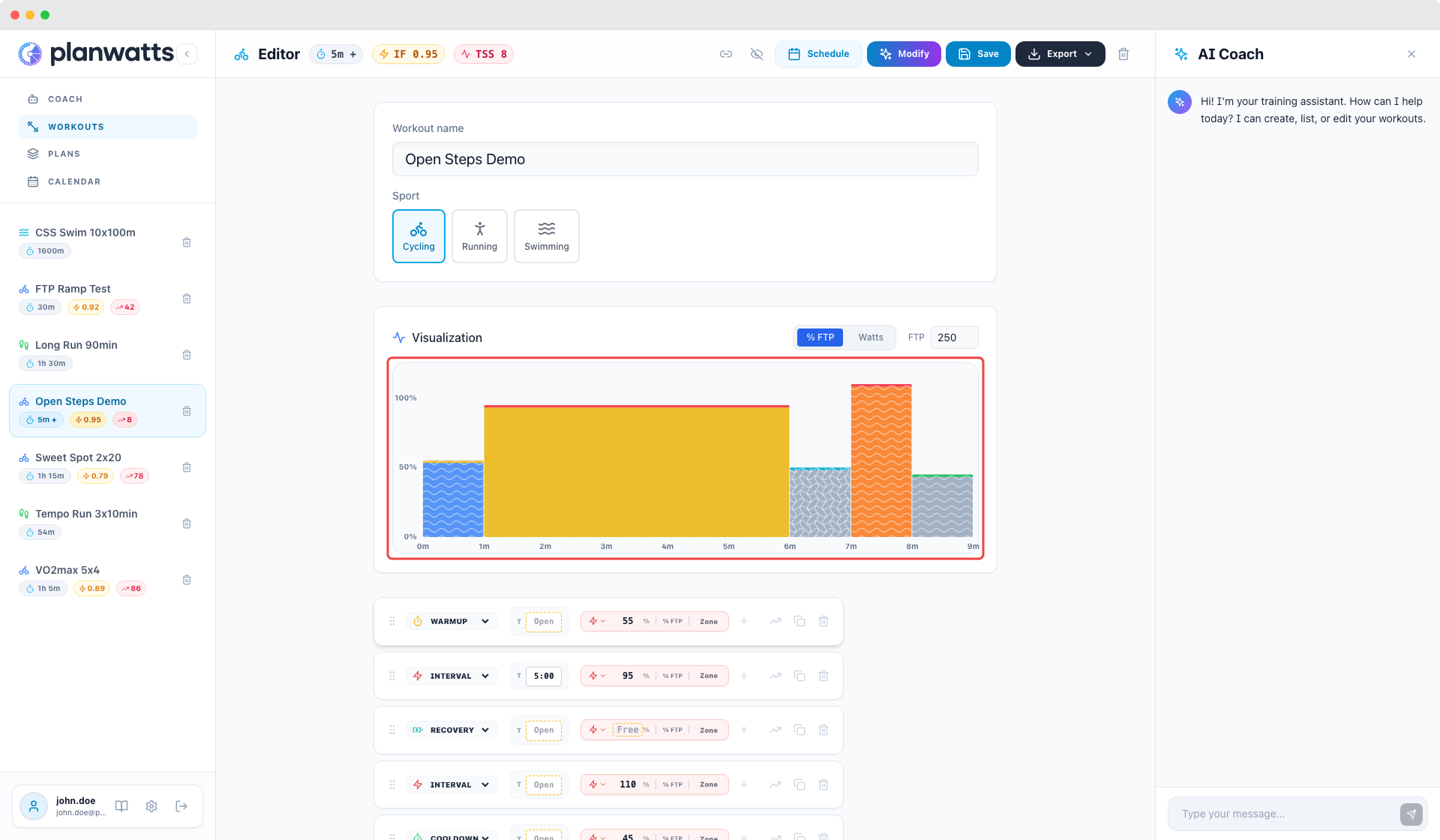
Open steps use a wave pattern overlaying the step's zone color:
- Open duration — horizontal waves (along the time axis)
- Open target — vertical waves (along the intensity axis)
- Both open — both wave patterns overlapping
The wave pattern makes open steps immediately recognizable in any workout chart, including the mini charts on library cards.
4. Duration Display
When a workout contains open steps, the total duration shows a "+" suffix — e.g., "25+ min" — to indicate the actual duration depends on when you press lap.
The open steps contribute 0 seconds to the total, so "25+ min" means "at least 25 minutes, plus however long you take on the open steps."
5. Device Behavior
On your Garmin, Wahoo, or other structured-workout-compatible device:
- Open-duration steps show the target (power/pace/zone) but display "Lap" or "Press Lap" instead of a countdown timer. You ride or run at the target until you're ready, then press the lap button.
- Free ride steps show no target — just ride or run freely until you press lap.
- Fixed-duration steps work as usual with a countdown.
Open steps sync to devices through Intervals.icu — the same sync mechanism used for all PlanWatts workouts.
6. Combining with Other Features
Open steps work with all other editor features:
- Inside repeat blocks — unusual but allowed (e.g., "4x [open warmup + 5min Z4]")
- With power ranges — open duration + min/max power target
- With cadence targets — open duration + target cadence
- Any sport — cycling (free ride), running (free pace), swimming (free swim)
The only exception is ramp steps — ramps inherently need a duration to define the power progression, so they can't be open.