Coach Memory
The AI Coach remembers things about you between conversations — your preferences, instructions, injuries, goals, and training context. This happens in two ways: you can tell the coach to remember something explicitly, and the coach also picks up relevant facts from your conversations automatically.
1. How It Works
Tell the coach directly
Use natural language to save anything you want the coach to keep in mind:
"Remember that I don't want cadence targets in my workouts"
"Remember that my left knee is recovering from surgery"
"Remember that I prefer polarized training"
Automatic learning
The coach also extracts key facts from your conversations — things like your training schedule, preferences you mention in passing, or goals you discuss. A built-in filter ensures only stable, meaningful facts are saved (not daily metrics or temporary information).
2. What Gets Saved
Coach Memory organizes facts into categories:
- Preferences — "No cadence targets", "I prefer fixed wattage", "Ramps in 5-minute intervals"
- Thresholds — "FTP is 150W", "Indoor FTP is 160W", "Max indoor session: 60 minutes"
- Goals — "Training for an Ironman in September", "Goal half marathon: 1:45"
- Medical — "Femoral neck fracture (Nov 2025)", "Gets stomach cramps with gels"
- Feedback — "Tempo intervals felt easy last week", "Cardiovascular drift during long efforts"
- Context — "Trains 4 days per week", "Available to ride 5-6 days", "Office work limits weekdays to 2h"
3. What Doesn't Get Saved
The coach deliberately does not save metrics that change daily or weekly — these are available in real time from your connected providers:
- CTL, ATL, TSB, weekly TSS
- HRV, resting heart rate, daily sleep score
- Daily weight, blood pressure, stress score
- Current training phase or week number
This prevents stale data from accumulating in your memory. If you see the coach mentioning your "current CTL," it's reading that live — not from a saved note.
4. Managing Your Memories
All saved notes are visible in your athlete profile under Coach Memory:
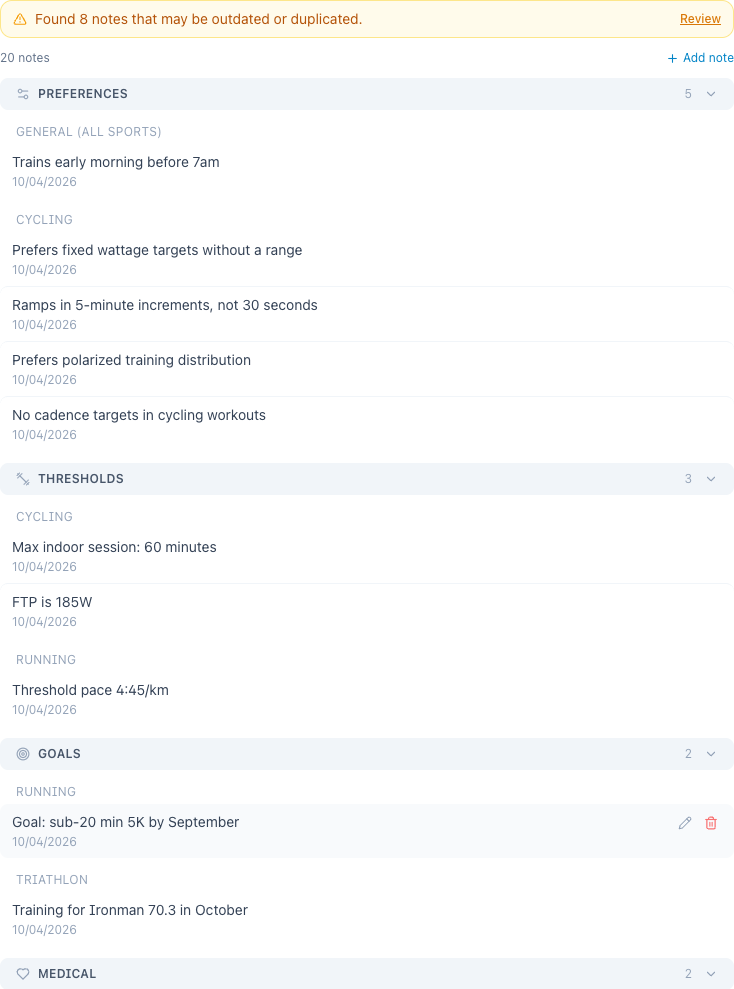
Notes are organized by type (Preferences, Thresholds, Goals, Medical, Feedback, Context) and by sport within each type. You can:
- View all notes with their category and date
- Edit any note inline (click the pencil icon)
- Delete notes that are no longer relevant
- Create notes manually using the "+" button — choose the type and sport
Notes that were used in your last workout or plan generation are marked with a "Used in last generation" badge, so you can see exactly what the coach considered.
You can also manage memories through chat:
"What do you remember about me?"
"Forget that I prefer polarized training"
5. Cleaning Up
Over time, some notes may become outdated or duplicated. Coach Memory includes a cleanup tool that detects:
- Outdated metrics — daily values that shouldn't have been saved
- Duplicates — notes that say the same thing with different wording
- Redundant data — facts already stored in your athlete profile (like FTP or power zones)
- Stale notes — context notes not updated in over 60 days
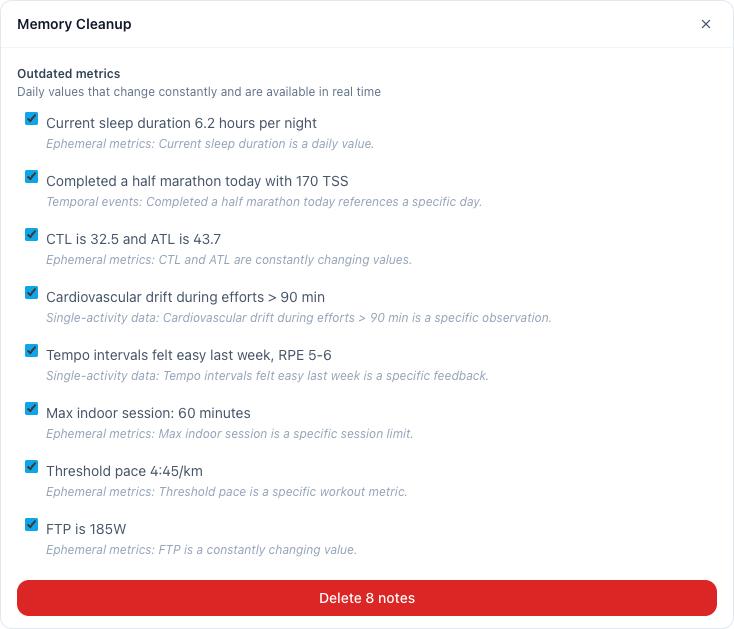
When cleanup candidates are found, a banner appears at the top of Coach Memory. Click Review to see the suggested deletions, deselect any you want to keep, and confirm.
6. How It Affects Coaching
Coach Memory is injected as context into every AI interaction:
- Workout generation always loads all your preferences, thresholds, goals, and medical notes for the relevant sport — these are not query-dependent
- Activity analysis accounts for injuries and limitations
- Plan creation considers your goals, available days, and training philosophy
- General coaching uses relevant context from your conversations
The coach treats memories as standing instructions. If you've saved "I prefer 3 sessions per week" but ask for a 5-session plan, the coach follows your current request.
7. Privacy
Coach memories are stored in your account and are only used to personalize your coaching experience. They are never shared with other users or used for any purpose beyond your own AI interactions. You can delete all memories at any time from your athlete profile.