Billing & Credits
PlanWatts uses a credit-based system tied to real AI costs. Every time you interact with the AI Coach — chatting, analyzing activities, generating workouts, creating plans — it consumes credits based on the actual model and tokens used. No arbitrary pricing, no hidden markups.
1. Plans & Pricing
| Free | Supporter | Pro | |
|---|---|---|---|
| Price | 0€ | 3€/month | 9€/month |
| Credits | 50/month | 150/month | 500/month |
| AI Model | GPT-5.2 | GPT-5.2 | GPT-5.2 + Claude Opus |
| Plan creation | No | Yes | Yes |
| Model selection | No | No | Yes |
| When credits run out | GPT-4o-mini | GPT-4o-mini | GPT-4o-mini |
| Credit rollover | No | Yes (max 300) | Yes (max 1,000) |
Key principles
- Almost no feature gates — chat, workouts, analysis, calendar, sync — everything works on every plan. The one exception is AI training plan creation, which requires Supporter or Pro (see below).
- Full model quality for everyone — while you have credits, you get access to the best AI models. No artificial downgrades.
- Graceful fallback — when credits are exhausted, the AI switches to a lighter model (GPT-4o-mini). You're never blocked or locked out. Responses may be less detailed, but everything still works.
Why AI plan creation requires Supporter or Pro
Designing a periodized training plan is the most demanding task the AI coach performs. It needs deep reasoning to analyze your fitness history, select the right periodization model, balance weekly load targets, and generate workouts that progress correctly across weeks and phases — all while considering your goals, injuries, and available days.
The fallback model (GPT-4o-mini) simply doesn't have the reasoning depth to do this well. Plans generated with it had inconsistent periodization, ignored athlete context, and produced unreliable weekly progressions. Rather than delivering a bad plan and pretending it's useful, we require Supporter or Pro credits (or BYOK) for plan creation — so you always get a plan built by a model that can actually reason about long-term training structure.
Supporter
For 3€/month — less than an energy gel — you support PlanWatts development and unlock AI training plan creation. You get 3x the credits of the free plan (150/month) with rollover. Same GPT-5.2 model, same coaching quality. If PlanWatts helps your training, this is the easiest way to help it grow.
Manage your subscription anytime via the Stripe Customer Portal — cancel, update payment method, or view invoices. Access it from Settings > Billing.
Pro
For 9€/month you get 10x the credits and access to Claude Opus — Anthropic's most capable model. Switch between OpenAI and Claude per conversation or set a default in Settings. Both providers deliver the same coaching quality, tools, and training science.
Credit Rollover
- Free plan: unused credits reset to 50 at the start of each billing cycle. No rollover.
- Supporter plan: unused plan credits roll over to the next month, up to a maximum of 2× your monthly allowance (300 credits max).
- Pro plan: unused plan credits roll over to the next month, up to a maximum of 2× your monthly allowance (1,000 credits max).
When credits are consumed, plan credits are spent first (since they can expire), and purchased credits are spent last (since they never expire).
Credit Packs
Need a quick top-up? Buy 200 credits for 5€ — a one-time purchase available to any user, Free or Supporter. Purchased credits never expire and are only consumed after your plan credits run out.
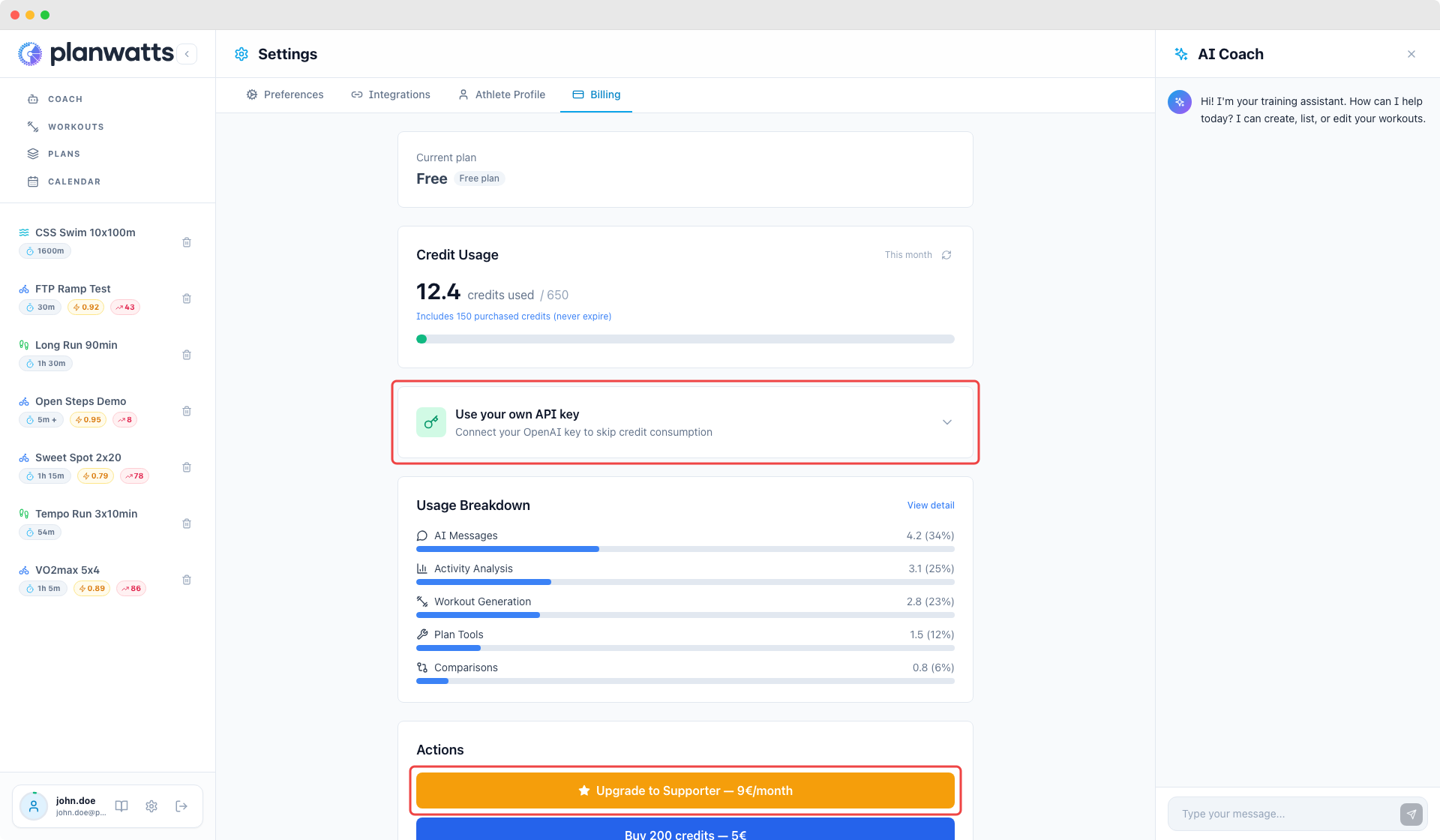
2. Bring Your Own Key (BYOK)
If you have your own OpenAI API key, you can plug it in under Settings > Billing and use it without a paid subscription. Your key is used for AI requests, so you pay OpenAI directly at their rates.
BYOK is available on any tier — it's a feature, not a plan. It's ideal for power users who want full control over their AI costs. PlanWatts never stores your key on the server; it's sent per-request and encrypted in transit.
3. Your Credit Balance
There are two places to check your credit usage:
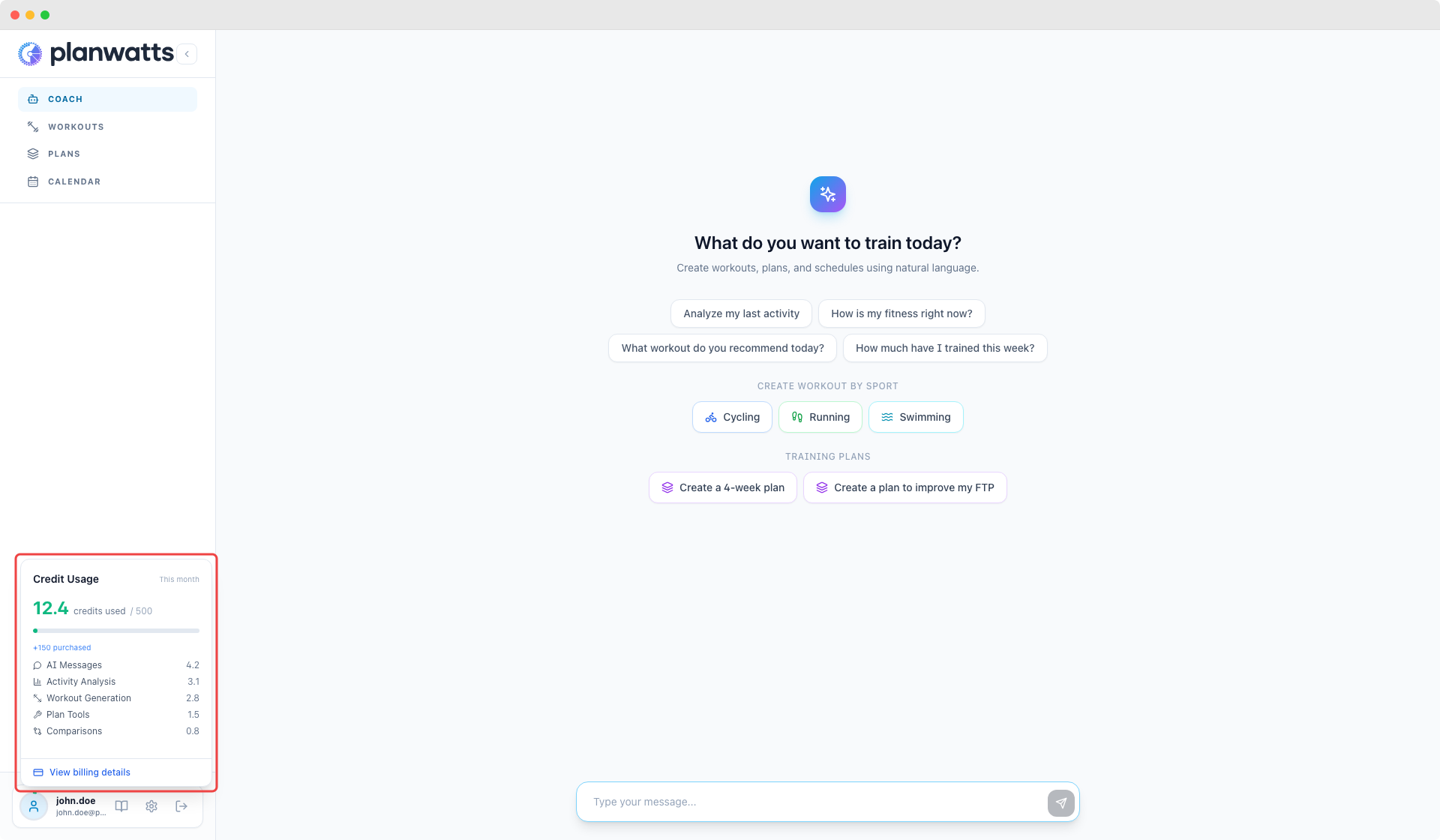
Sidebar Widget
The avatar in the bottom-left corner of the app shows a ring that fills up as you use credits. Click it to see a quick summary of your usage this month, broken down by action type.
Settings > Billing
For the full picture, head to Settings > Billing. Here you'll find:
- Total credits used this month with a visual progress bar
- Usage breakdown — which types of AI actions (chat, analysis, workout generation, plan tools) consume the most credits, shown as percentage bars
- Usage detail — click "View detail" to see a complete timeline of every AI interaction, the model used, and its credit cost
- Subscription management — subscribe, upgrade, or manage your plan
- BYOK configuration — enter your OpenAI API key
- Credit packs — buy additional credits
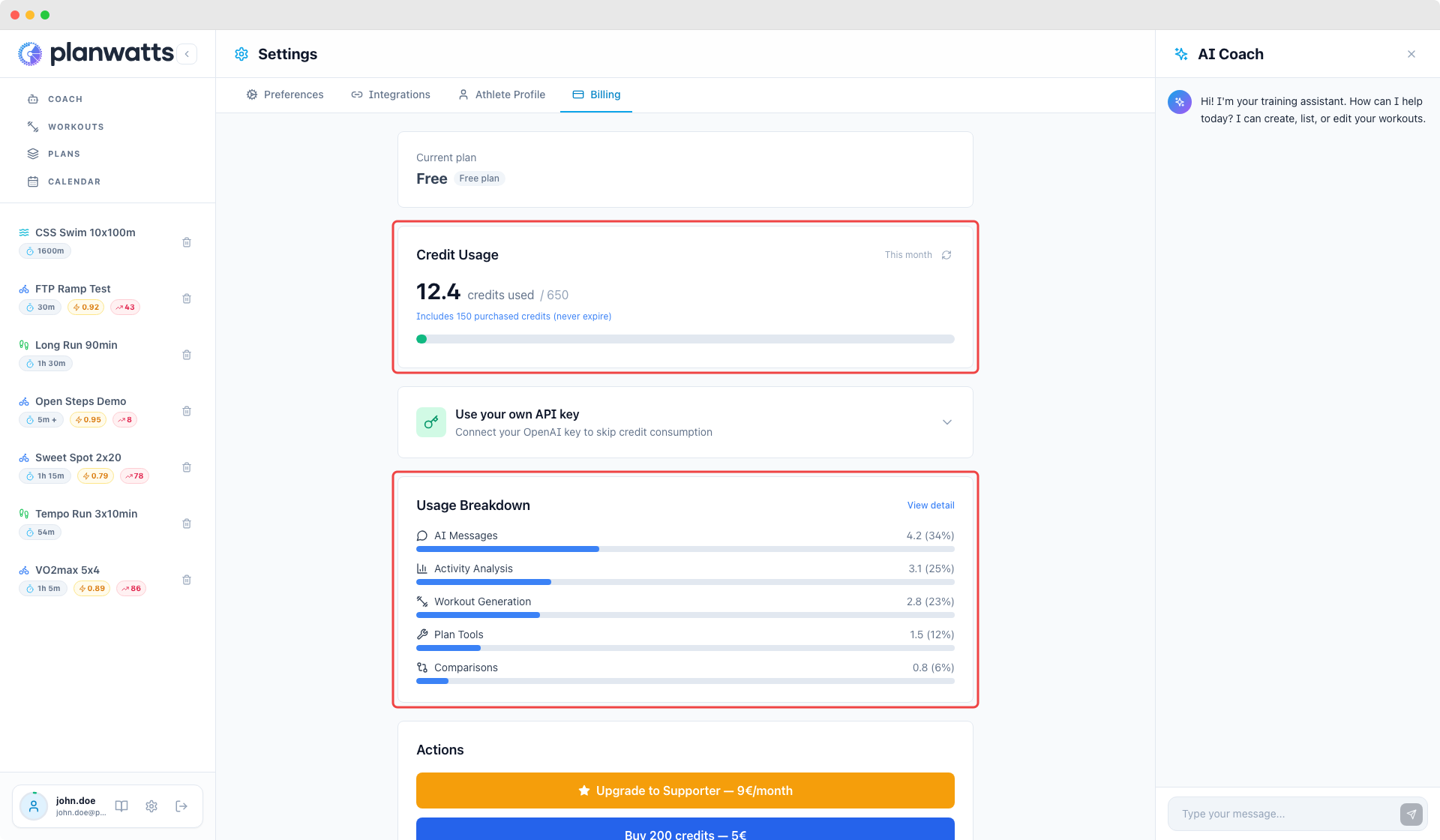
The refresh button syncs any pending costs that haven't been reconciled yet (this can happen when a conversation is still processing).
4. How Credits Work
Every AI action has a real cost determined by:
- The model used — more capable models (used for coaching, analysis, plan generation) cost more than lightweight models (used for routing and quick responses)
- Tokens consumed — longer conversations and more complex analyses use more tokens
- A small infrastructure margin — covers server, database, and platform costs
The credit cost is calculated from actual Langfuse telemetry data — the same monitoring system used to track quality and performance.
What Counts as an AI Action?
| Action | What it does | Typical cost |
|---|---|---|
| Chat | General conversation with the AI Coach | Low-Medium |
| Activity Analysis | Deep-dive into a completed activity | Medium |
| Comparison | Side-by-side analysis of two activities | Medium-High |
| Workout Generation | Creating a structured workout | Medium |
| Plan Tools | Plan creation, scheduling, phase filling | Medium-High |
Costs vary based on conversation length and complexity. A quick "what should I do today?" costs far less than a 20-message plan design session.
5. Promotion Codes
Have a promo code? Enter it during Stripe checkout when subscribing or buying a credit pack. Codes may offer a discount on your first months or bonus credits.
6. FAQ
Will any features be locked behind a paywall? Almost none. Chat, workouts, activity analysis, comparisons, calendar, sync — all available on every plan. The only exception is AI training plan creation, which requires Supporter or Pro credits or BYOK. This is because plan generation needs deep reasoning that lighter models can't deliver reliably — see "Why AI plan creation requires Supporter or Pro" above.
Can I still use PlanWatts for free? Yes. The Free plan has 50 credits/month. When credits run out, the AI uses a lighter model but everything still works — except AI plan creation, which needs Supporter or Pro credits.
What happens when I run out of credits? The AI Coach switches to GPT-4o-mini — a lighter, faster model. You can still use every feature (chat, analysis, workouts, calendar, sync), but responses may be less nuanced. AI plan creation is disabled on the fallback model because it can't produce reliable periodization. Free plan credits reset at the start of each billing cycle; Supporter and Pro plan credits roll over (up to 2× monthly).
Why credits instead of a flat subscription? Because AI costs vary enormously by usage. A flat fee would either overcharge light users or subsidize heavy users. Credits let you pay proportionally to what you actually use.
Can I use my own API key with any provider? Currently BYOK supports OpenAI keys. Support for additional providers may be added in the future.
Do purchased credit packs expire? No. Credit packs are one-time purchases and the credits never expire. They're always spent last — plan credits are consumed first, so your purchased credits are protected.
Do unused monthly credits roll over? It depends on your plan. Free: credits reset to 50 each cycle — no rollover. Supporter: unused credits roll over to the next month, capped at 2× your monthly allowance (300 max). Pro: unused credits roll over, capped at 2× monthly allowance (1,000 max). Both give you a buffer of up to one saved month.